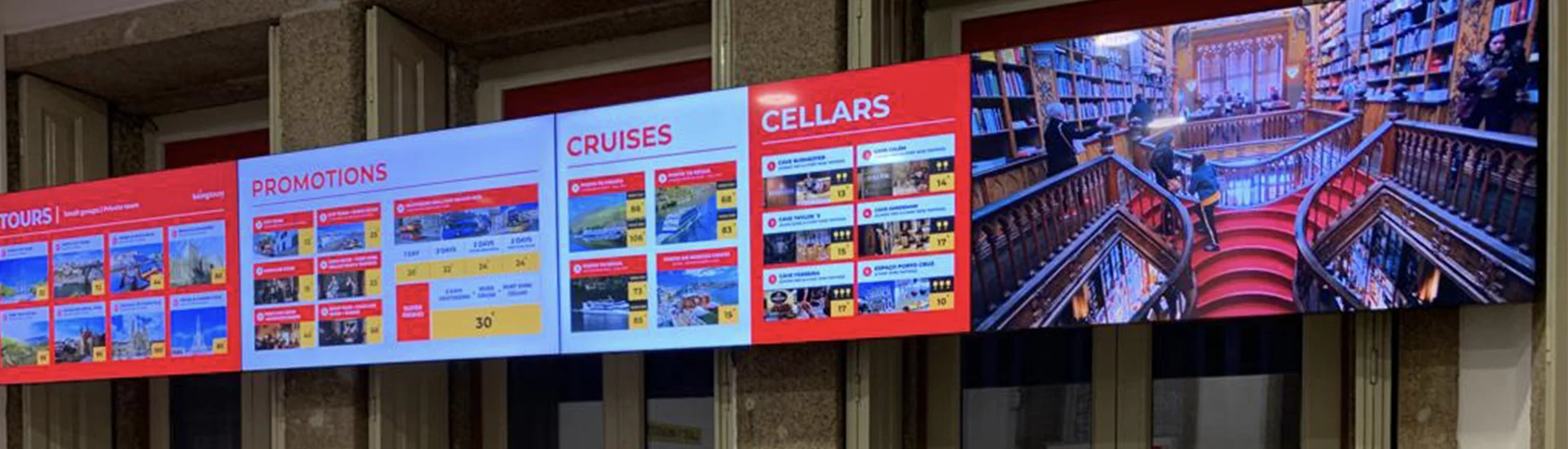
A display connected to a computer is not Digital Signage. It is a display. The difference lies in what operates behind it: a platform that determines what appears, where it appears, at what time and for whom. This management layer is what transforms a collection of displays into a communication tool—and it is where most projects either fail or distinguish themselves.
This guide explains what Digital Signage is, how it differs from traditional signage, which components make up a system, what to look for in content management software and how to assess the right solution for your space.
What is Digital Signage?
Digital Signage is the distribution of audiovisual content – information, promotions, wayfinding and internal communications – on centrally managed digital displays that can be updated in real time. The content is not stored on the display itself and does not depend on a USB stick: it is published from a platform and distributed across the display network.
Digital Signage is particularly useful in settings where information changes frequently. A printed timetable can become outdated; a display can be updated remotely. A printed menu requires reprinting when prices change; a digital menu can be changed on the platform and shown on selected displays.
Are “sinalética digital”, “sinalização digital” and “Digital Signage” the same thing?
In Portuguese, the three terms are often used interchangeably. “Sinalização digital” may be more closely associated with wayfinding – maps, directories, arrows and room directions – while “sinalética digital” and “Digital Signage” are also used for promotions, internal communications and informational content. In practice, the meaning depends on the context and the solution described.
How a Digital Signage system works
A Digital Signage system combines several elements. The appropriate configuration depends on the space, the content and how the display network will be managed.
Professional displays. The choice depends on factors such as the installation location, lighting, intended orientation and planned operating hours. Some installations may require equipment designed for specific environmental conditions.
Media player. The equipment or software that receives content and presents it on the display. The solution can vary depending on the platform, content type and project requirements.
Content management software. Allows users to organise and publish content, create schedules and manage one or more displays from a platform.
Infrastructure. Installation may involve a network, electrical power, mounting hardware, cabling and access for maintenance. These aspects should be assessed during the technical design.
What to assess in content management software
The management platform is a central part of the system. Before choosing one, confirm that it allows you to manage the required displays, organise content and schedule its presentation in a way that fits your team’s operations.
It is also important to understand how updates are made, what permissions can be assigned to users, whether the platform supports a presentation consistent with the brand identity and whether it supports the intended content types – for example, information, promotions, wayfinding or internal communications.
The InteliAV DS platform allows content to be planned, updated and controlled across multiple displays from a central point, according to the features included in the contracted solution.
Digital Signage by sector: where can it be used?
The same technology can support different communication needs depending on the space and its audience.
Digital Signage in corporate environments
In reception areas and lobbies, displays can show welcome messages, schedules or company news. In corridors, canteens and communal areas, they can be used for internal communications. Outside meeting rooms, panels can display availability and booking information when integrated with the relevant systems. In meeting rooms, displays can support presentations and event broadcasts.
Digital Signage in retail
In shop windows and inside stores, displays can show campaigns, product information and brand content. Near points of sale, they can communicate promotions or loyalty programmes. In shopping centres, they can display directories, maps, events and information about shops.
Digital Signage in hospitality and food service
In hotels, restaurants and bars, displays can present information about services, events and menus. In conference rooms, they can help communicate schedules and direct visitors. Content and equipment should be selected according to the installation location and operational needs.
Digital Signage in education
In educational institutions, displays can show welcome messages, campus maps, timetables, notices, events and room information. In libraries and canteens, they can communicate space availability or menus. In classrooms and lecture theatres, they can support presentations and content sharing.
Digital Signage in healthcare
In clinics and healthcare facilities, displays can present service information, health campaigns, directions and educational content. Their use must comply with applicable privacy and communication rules in the healthcare context.
Benefits and limitations of Digital Signage
Digital Signage allows organisations to update content without reprinting materials, adapt messages to different locations and times, and manage multiple displays from one platform. Dynamic content may also be better suited to messages that change frequently.
However, technology does not replace a communication strategy or guarantee greater attention or better results on its own. Its usefulness depends on the quality and relevance of the content, the suitability of the displays for their location and the existence of processes to keep information up to date.
How to choose a Digital Signage solution
Communication objective. Define whether you want to inform, promote, guide or support internal communications.
Number and location of displays. Identify the spaces, number of displays and viewing conditions.
Content and updates. Determine what content will be shown, who will prepare it and how often it will be updated.
Integrations. Check whether the platform needs to connect to calendars, space management systems or other information sources.
Infrastructure. Assess the network, electrical power, mounting hardware, cabling and access for installation and maintenance.
Operation and support. Define who will manage the content and what technical support will be needed during use.
Mistakes to avoid in a Digital Signage project
Choosing displays before defining the objectives and platform can lead to incompatibilities or an unsuitable solution. It is also important not to overlook the technical design, user training and responsibility for updating content. A system installed without an operating plan may end up displaying outdated information.
Frequently asked questions about Digital Signage
Is Digital Signage the same as a video wall? No. Digital Signage refers to the management and presentation of content on displays. A video wall is a configuration of multiple displays that functions as a large-format visual surface. A Digital Signage system can manage content shown on a video wall if the solution is compatible.
Can content be updated remotely? Many platforms allow content to be managed and updated remotely. Confirm the features, network requirements and conditions of the chosen solution.
Can it be used in a single shop or reception area? Yes. The number of displays influences the scale of the project, but an installation can also be planned for a single space.
Who prepares the content? Content can be prepared by the organisation’s team or by a provider, depending on the contracted service. It is important to define who will be responsible for updates.
What equipment is needed? This depends on the location, content, platform and intended mode of operation. The project should specify the appropriate displays, media players, network and mounting hardware.
Conclusion
Digital Signage can be a useful solution when an organisation needs to communicate changing information, manage content across multiple displays or adapt messages to different spaces. To make an informed choice, start with the objectives and day-to-day operation; then assess the platform, equipment and infrastructure.
InteliAV designs and implements Digital Signage solutions, including the InteliAV DS platform, installation, training and technical support, depending on the scope of the project. You can explore InteliAV’s Digital Signage solution or contact the team to discuss the needs of your space.