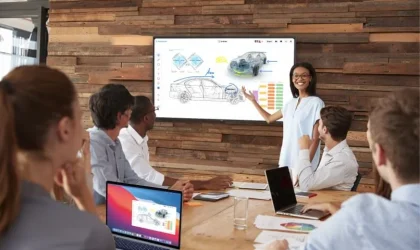
A well-equipped meeting room makes communication between in-person and remote participants easier, reduces technical problems and simplifies content sharing. The right solution depends on the size of the room, the number of users, the type of meetings and the platforms used by the company.
What should a modern meeting room include?
There is no single configuration for every room. A small room used mainly for quick calls has different needs from a boardroom or a presentation space. Even so, there are components worth considering together:
- Professional display: allows participants to view presentations, documents and remote attendees. Its size and position should suit the viewing distance and room layout.
- Video conferencing camera: captures participants with appropriate framing. In larger rooms, a camera with movement or automatic framing options can make remote participation easier.
- Microphones and audio system: help ensure that voices are captured and heard clearly. The choice depends on the size of the table, the acoustics and how people are seated. InteliAV offers professional audio systems suited to different spaces and needs.
- Collaboration system: allows users to start meetings and share content from compatible computers or devices, with or without cables, depending on the installed solution.
- Simple controls: an intuitive panel or interface can centralise functions such as turning on the system, adjusting the volume and selecting the video source.
Video conferencing: bringing in-person and remote participants together
In hybrid meetings, the experience depends both on what happens in the room and on how remote participants are included. A poorly positioned camera, voices that are difficult to hear or a display that does not allow participants to follow the conversation can make the meeting less smooth.
The design should therefore take into account camera placement, audio capture across the entire area in use, and how participants and content are shown on screen. It is also important to confirm compatibility with the video conferencing platforms used by the organisation and establish a simple way to start the meeting.
Explore our video conferencing and collaboration solutions for bringing in-person and remote participants together.
Hassle-free content sharing
Sharing presentations should be easy for the person leading the meeting and for other participants. Depending on requirements, this can be done through a wired or wireless connection, or using dedicated collaboration equipment.
Before choosing, it is worth checking which devices will be used, whether content needs to be shared from multiple computers and whether users need to present without installing additional applications. A predictable experience reduces interruptions and helps keep the meeting focused.
How do you choose a solution for the room?
The assessment should begin with how the space is actually used, rather than selecting equipment in isolation. Consider these aspects:
- Size and layout: the usual number of participants, distance from the display, table shape and areas in use.
- Type of meeting: video conferences, presentations, hybrid meetings, internal calls or collaboration sessions.
- Acoustics and noise: reverberation, surface materials and outside noise can influence sound capture and playback.
- Existing technology: equipment, cabling, network and platforms already used by the company.
- Ease of use: the solution should be straightforward for regular users and visitors alike.
- Maintenance and future changes: it is worth planning access to equipment and allowing for the system to be adapted as needs change.
Explore InteliAV’s solutions for the corporate sector as well.
Integration and installation: thinking of the system as a whole
Displays, cameras, microphones, loudspeakers and control systems should work together. Integration helps prevent users from having to switch between multiple controls or search for the correct input before each meeting.
Installation should also take into account equipment placement, cable routing, electrical power, the network and access for maintenance. Each space should be assessed individually to define a configuration compatible with its architecture and use.
A room prepared for the way your team works
An audiovisual solution for meeting rooms should reflect the team’s working habits and simplify everyday tasks: joining a call, hearing and being heard, presenting content and collaborating with colleagues remotely.
InteliAV can support the assessment of the space and the definition of an audiovisual solution tailored to your company’s needs, from equipment selection through to integration and installation.
Need to improve a meeting room or equip a new space? Request a proposal from InteliAV.